
How To Create an eBay Listing From Photos Using AI
Turn your product photos into an editable eBay listing draft with SimpleSellers. Discover how AI helps generate product titles, descriptions, item specifics and category suggestions, refine individual fields, and review market price references before copying your listing to eBay.

Creating an eBay listing from scratch can involve several steps. You need to identify the product, choose a suitable category, write a title and description, add item specifics, describe the condition and consider an appropriate asking price.
AI can help with some of this groundwork by using information available in your product photographs and the details you provide.
SimpleSellers uses product photographs and seller-supplied information to create an editable eBay listing draft. You can then review the generated information, refine individual fields, review the market price references and make your own edits before copying the listing draft to eBay.
How Does AI Create an eBay Listing From Photos?
An AI listing generator can analyse information visible in product photographs, such as brand names, labels, colours, model information and other product characteristics. You can also provide additional details that may not be visible in the images.
SimpleSellers brings this information into one workflow:
Product photos → Product details → AI-generated listing draft → Review and refine → Save and copy to eBay
The generated information should always be checked against the actual product before you use the listing draft.
How to Create an eBay Listing From Photos Using SimpleSellers
1. Upload or Take Your Product Photos

For the best results, make sure your photographs clearly show:
Start by uploading one or more product photographs from your device, or take photographs using your phone.
For the AI to work with useful product information, make sure your photographs clearly show:
- The overall product and its main sides
- Brand and product labels
- Size, model or identifying information
- Visible wear, damage or imperfections
- Important markings or visible text
- A clean, uncluttered background
Multiple photographs can provide more information than a single image, particularly when showing product condition or different identifying details.
2. Add Information That Is Not Visible in the Photos
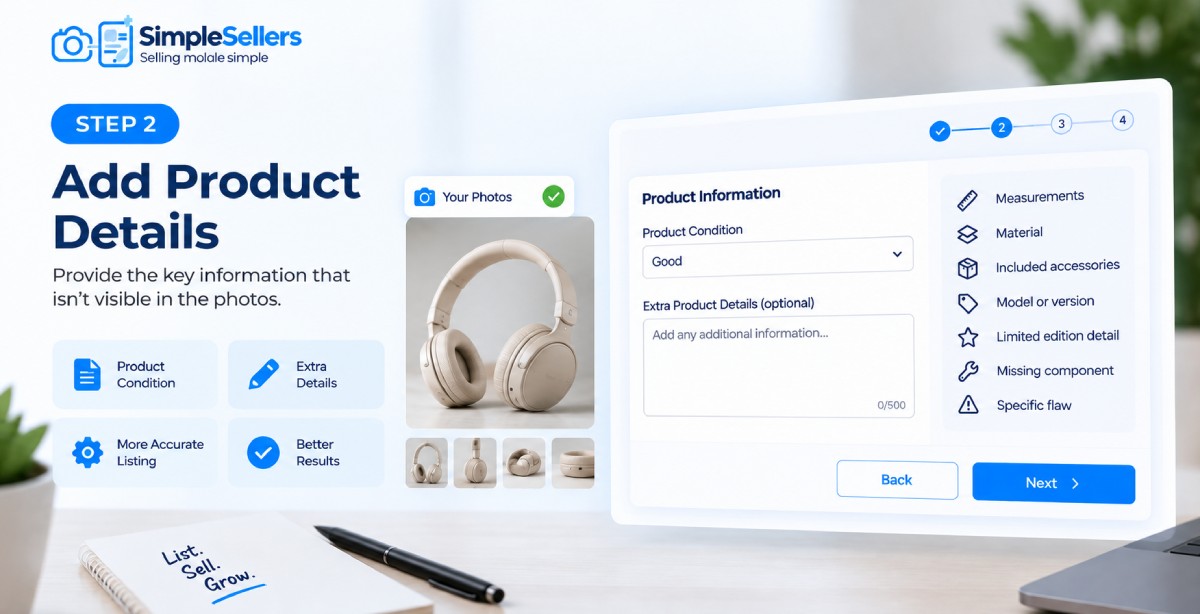
Photographs may not show every detail needed for an eBay listing.
After adding your photographs, select the appropriate Product Condition and enter any Extra Product Details that are not clear from the images.
For example, you can add:
- Measurements
- Material
- Included accessories
- A particular model or version
- A limited-edition detail
- A missing component
- A specific flaw
This gives SimpleSellers additional information to use when creating the listing draft.
3. Select eBay as Your Marketplace

Select eBay from the available marketplace options.
SimpleSellers currently supports Amazon, eBay, Vinted, Facebook Marketplace and Gumtree. When eBay is selected, the generated eBay listing draft is structured for use on eBay.
Marketplace requirements can change, so review the current eBay requirements before using the generated draft.
4. Generate an eBay Listing Draft From Your Photos

Select Generate Listing.
SimpleSellers uses the information available in your product photographs together with the additional details you entered to create an editable listing draft.
The generated draft may include:
- Category Path
- Product Type
- Product Title
- Description
- Condition and Condition Notes
- Features
- Item Specifics
- Keywords
Depending on the information available, it may also suggest details such as colour, finish, shape, pattern, intended use and relevant visible text.
Seller check: AI-generated information may be incomplete or incorrect. Check important details against the actual product, labels and other available information before using the draft.
5. Review the AI-Generated eBay Listing Draft

The generated eBay listing draft is editable, so you can check the information before using it on eBay.
Review areas such as:
- Product title
- Description
- Condition
- Item specifics
- Features
- Category
- Product type
- Keyword suggestions
If something is missing or incorrect, make the required changes before saving the listing.
6. Refine Individual Listing Fields With AI

If a particular part of the listing needs improvement, you can use AI Refine on individual fields.
For example, you can refine:
- Description
- Features
- Keyword suggestions
- Item specifics
- Condition and condition notes
- Category
- Product type
AI Refine works on individual fields rather than regenerating the entire listing. You can review the revised wording and make further manual edits where necessary.
7. Check the Market Price References

Use Price Look Up to find the same or similar products currently available online and review their listed prices.
Select Price Look Up to search for relevant product listings. SimpleSellers provides Market Price References, including:
- Average
- Market Range
The results may include similar products when an exact match is not available. You can also review the products used for the price reference, including their listed prices and other available information.
These figures are market price references based on available product listings. They are not confirmed sale values, professional valuations or guarantees of what your product will sell for. Actual selling prices may vary depending on factors such as condition, model, demand, location, postage and marketplace fees.
You decide the final price used in your eBay listing.
8. Save and Copy Your Listing

Once you have reviewed the generated information, made any required changes and reviewed the market price references, save the listing draft.
Saved listings can be revisited and edited when needed.
When you are satisfied with the listing draft, you can copy the content to eBay. SimpleSellers currently creates, saves and copies listing drafts; it does not publish listings directly to eBay.
What Information Can AI Identify From Product Photos?
The information available to the AI depends on what can be seen clearly in the photographs.
It may identify or suggest details such as:
- Brand or visible text
- Product type
- Colour
- Model information
- Shape or design
- Visible features
- Visible condition indicators
- Other product attributes
However, a photograph cannot always provide enough information to determine every listing field accurately. Seller-supplied details and manual review remain important.
Trademark notice: eBay, Amazon, Vinted, Facebook Marketplace and Gumtree are trademarks of their respective owners. SimpleSellers is not affiliated with, endorsed by or sponsored by these marketplaces.
Conclusion
Creating an eBay listing from product photographs can start with clear images and the information you already know about the product.
SimpleSellers uses those photographs and seller-supplied details to create an editable eBay listing draft, including information such as the product title, description, category, item specifics and condition details.
You can then review the generated information, refine individual fields, review the market price references, make your own edits and save the listing draft before copying it to eBay.
The AI handles part of the initial listing groundwork, while you remain in control of checking and finalising the information.
Ready to turn your product photos into an eBay listing? Create Your First Listing.
FAQs
Q1. Can I start an eBay listing draft from product photos?
Yes. You can start an eBay listing draft from product photographs using SimpleSellers. SimpleSellers analyses the available information in the photographs and combines it with any additional details you provide to create an editable listing draft.
For more complete results, provide clear photographs and add information that is not visible in the images.
Q2. How does AI identify product information from photos?
AI analyses information that is visible in the product photographs, which may include labels, visible text, colours, product characteristics and other identifiable details. The accuracy depends on the quality and completeness of the information available.
Always verify important details before using the generated listing draft.
Q3. Can I start an eBay listing draft from one photo?
Yes. One photograph can be used as a starting point for an eBay listing draft. However, multiple clear photographs from different angles may provide more information about the product, its condition and identifying details.
Q4. Can I edit the AI-generated eBay listing draft?
Yes. You can manually edit the generated listing draft and use AI Refine to revise individual fields before saving or copying it to eBay.
Q5. Does SimpleSellers publish the AI-generated listing directly to eBay?
No. SimpleSellers currently creates editable eBay listing drafts. You can review, edit, save and copy the listing draft to eBay.
Q6. Does SimpleSellers provide an eBay listing price reference?
Price Look Up provides Market Price References based on available listings for the same or similar products. The results include an Average and Market Range. These are market price references, not confirmed sale values or guarantees of what your product will sell for.